Why MCP Tool Access Does Not Replace Runtime Identity
MCP can narrow which tools an agent may call, but it does not replace runtime identity, delegated user access, or downstream system permissions.
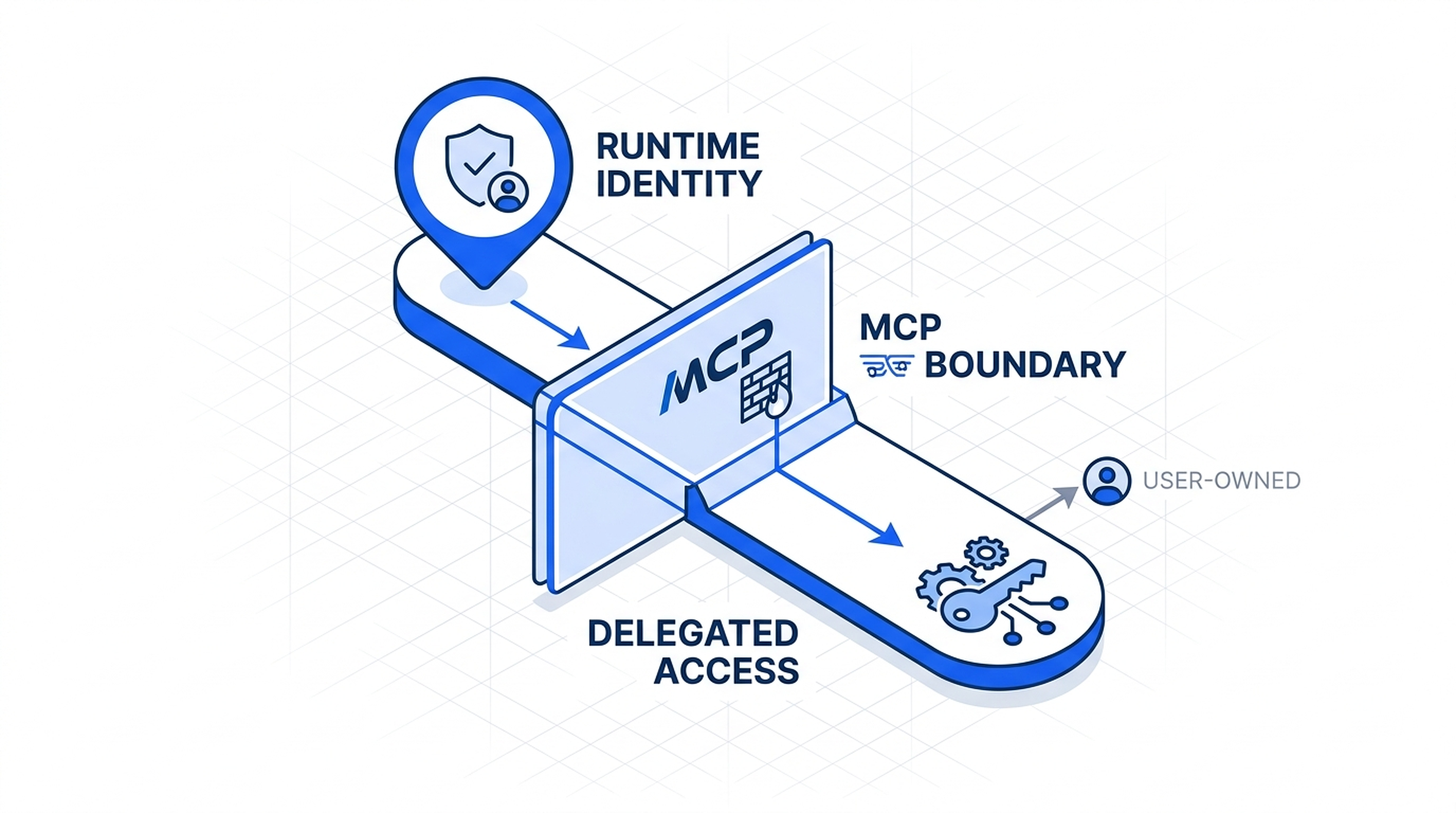
Visual explainer
A diagram-led way of understanding the underlying structure.
MCP can narrow which tools an agent may call, but it does not replace runtime identity, delegated user access, or downstream system permissions.
Runtime identity defines the agent as a principal.
MCP defines which tools the runtime may call.
Delegated access is only for user-owned systems, and target systems still enforce their own permissions.
Watch the video
Why MCP Tool Access Does Not Replace Runtime Identity
I keep seeing the same confusion in agent system design. Teams notice that MCP can control which tools the runtime may call, then assume that means MCP has solved identity. It has not. MCP narrows the tool surface. It does not define who the agent is, when the agent is acting on behalf of a user, or what the target system still permits once the call gets there.
That separation matters because these layers answer different questions. If I collapse them into one vague idea of access, I get weak audit trails, messy revocation, and no clean way to explain what happened when an agent crosses from platform work into user-owned systems.
I've watched teams at three different Fortune 500s make this exact mistake in the last six months. They start with Anthropic's MCP or similar tool-gating approaches, thinking they've solved identity and access management for their agent systems. Two months later, they're scrambling to retrofit proper identity layers after their first security audit or compliance review. The problem isn't MCP. The problem is thinking MCP does something it was never designed to do.
Where the Layers Actually Sit
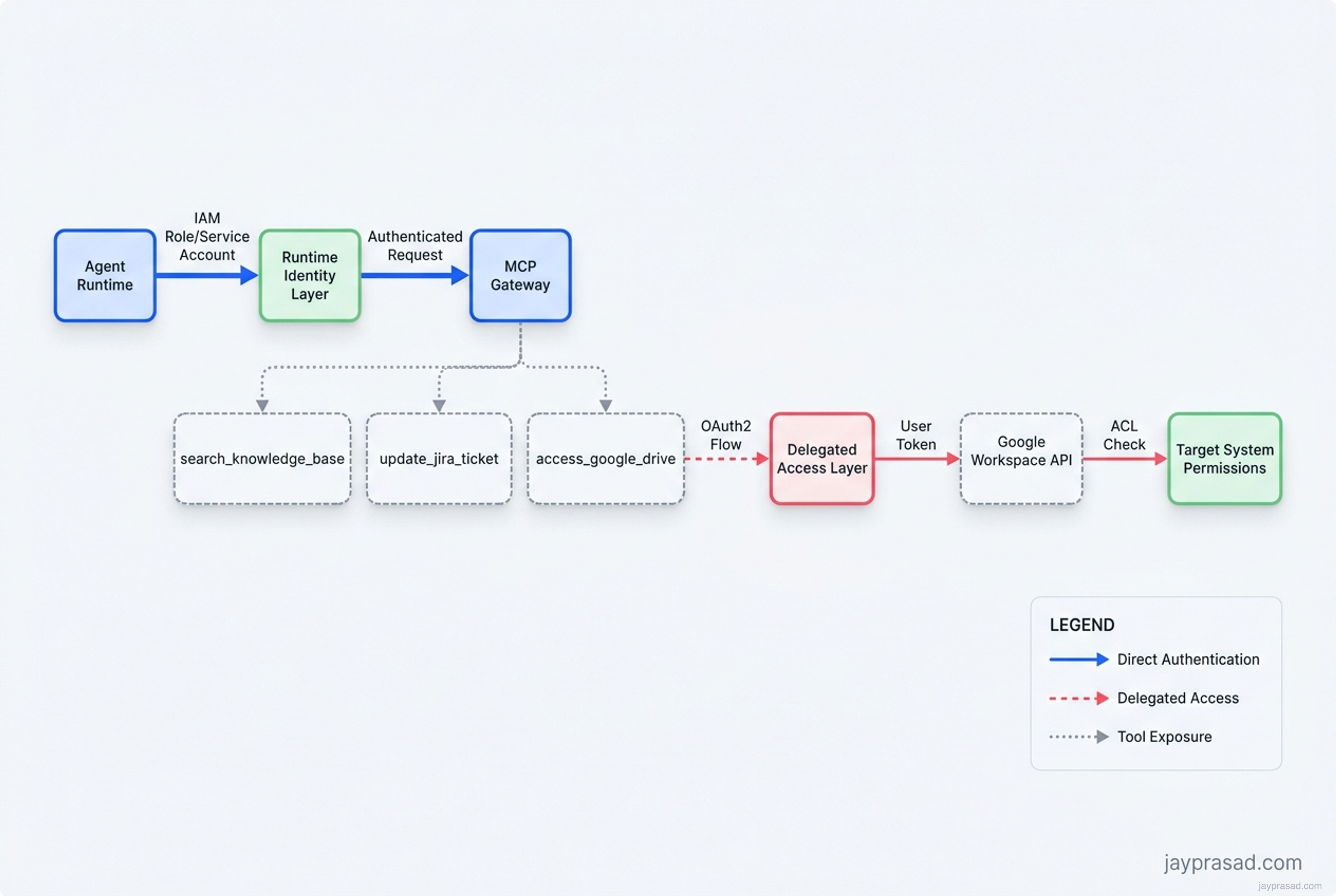
The simplest way to read the flow is left to right. The runtime acts as the workload. Runtime identity answers who the agent is. MCP answers which tools that runtime may call. Delegated access appears only when one of those calls crosses into a user-owned system. The target system still has the final say over what happens next.
| Layer | Question it answers | What it controls | Why it matters |
|---|---|---|---|
| Runtime identity | Who is the agent? | Machine principal for the running workload | Gives the system a real non-human identity with audit and revocation |
| MCP access boundary | Which tools may it call? | Allowed tool surface and MCP server access | Narrows the runtime's reach without defining the whole identity model |
| Delegated access | Is the agent acting on behalf of a user? | User-scoped authorization for user-owned systems | Keeps consent and revocation tied to the person who owns the data |
| Downstream permissions | What can the target system still allow? | System-specific scopes, ACLs, and resource permissions | Prevents a tool call from being mistaken for unlimited power |
Think about how this plays out in practice. Your LangGraph agent running on AWS ECS needs to call tools. The ECS task has an IAM role (runtime identity). That role can authenticate to your MCP gateway. The MCP gateway exposes specific tools like searchknowledgebase or updatejiraticket. So far, so good. But when that same agent needs to access a user's Google Drive through the Google Workspace API, you need OAuth2 delegation. The MCP layer doesn't handle that. It can't. It's a different problem domain entirely.
Runtime Identity Patterns That Actually Work
I see three main patterns emerging for runtime identity in production agent systems. Each has tradeoffs, but all of them treat runtime identity as a first-class concern separate from tool access control.
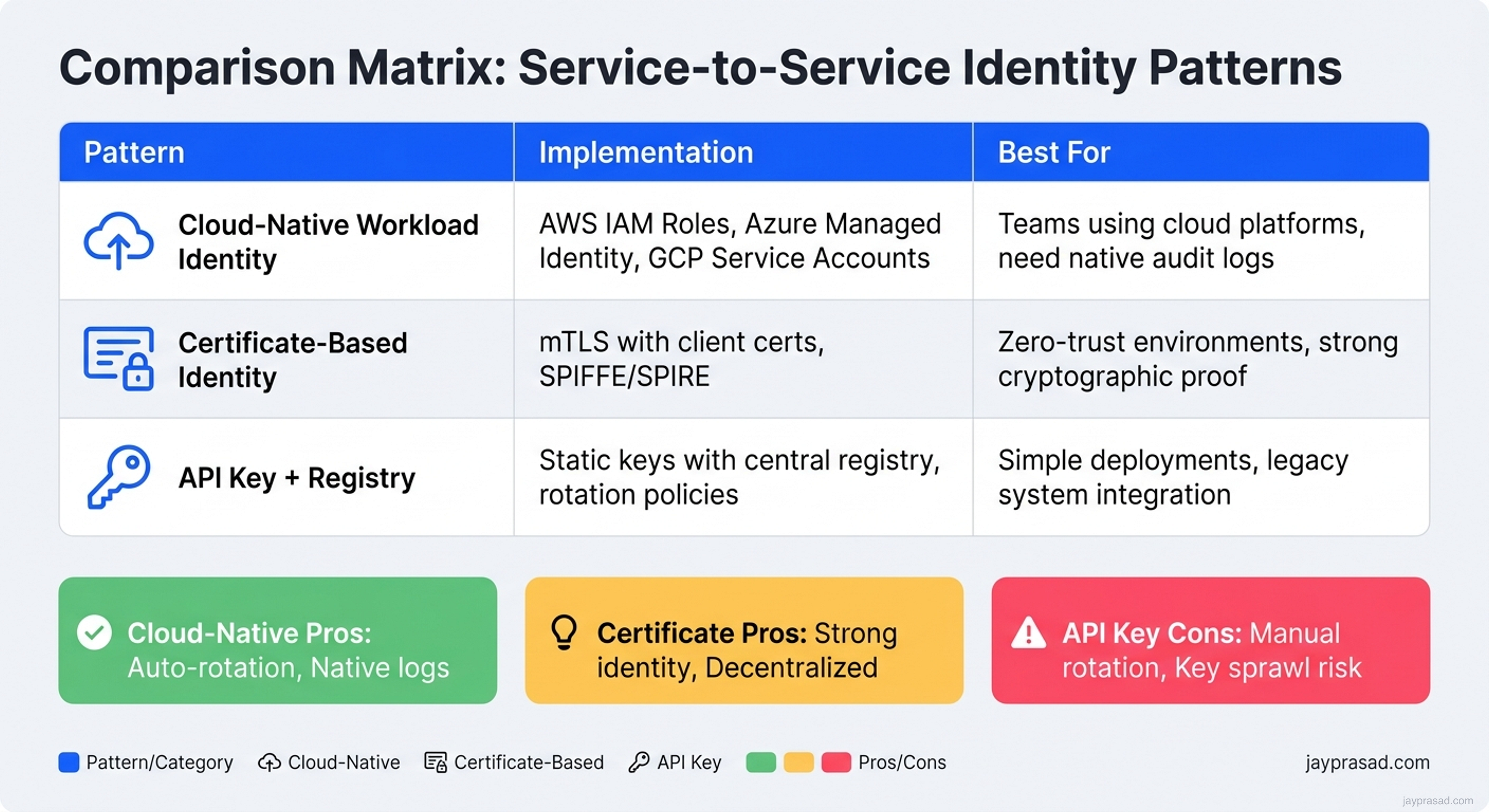
Pattern 1: Cloud-Native Workload Identity
This is what I recommend for most teams. Use AWS IAM roles for ECS/Lambda, Azure Managed Identity for Container Apps, or Google Service Accounts for Cloud Run. Your agent runtime gets a real identity that cloud services understand natively.
Agent Pod (GKE) → Workload Identity → Service Account → MCP Gateway → Tool ServersThe beauty here is that you get audit logs, key rotation, and revocation for free. When I implemented this at a financial services client using AWS Bedrock Agents with ECS Fargate, we could trace every tool call back to a specific task ARN and IAM role session.
Pattern 2: Certificate-Based Identity
Some teams prefer mTLS with client certificates. Your agent runtime presents a certificate, the MCP gateway validates it, and you get strong cryptographic identity. I've seen this work well with SPIFFE/SPIRE deployments where teams already have PKI infrastructure.
Pattern 3: Token-Based Service Identity
For simpler deployments, API keys or JWTs can work. But you need rotation, secure storage, and audit trails. I watched one team use Hashicorp Vault to issue short-lived tokens to their CrewAI agents. It worked, but the operational overhead was significant.
MCP's Real Job in the Stack
Let me be clear about what MCP does well. It's a protocol for exposing tools to LLMs in a standardized way. When Anthropic designed it, they were solving the "how do we let Claude Desktop talk to local tools safely" problem. That's fundamentally different from enterprise identity management.
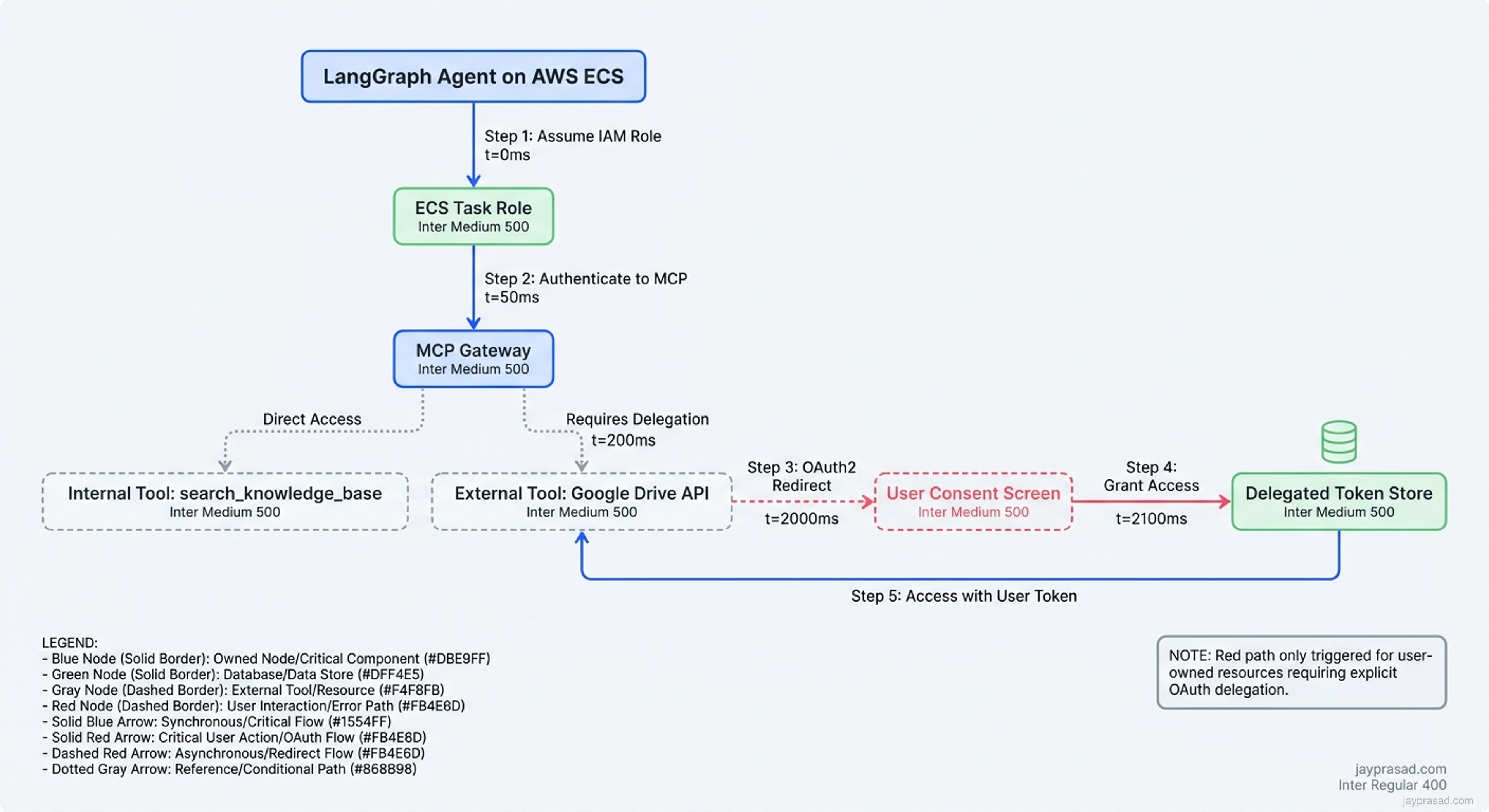
Here's what MCP actually controls:
- Tool Discovery: Which tools does this runtime even know about?
- Schema Definition: What parameters do these tools accept?
- Transport Security: How do tool calls flow between client and server?
- Access Gating: Can this client call this particular tool?
What MCP doesn't control:
- Who is making the call: That's runtime identity
- On whose behalf: That's delegated access
- With what permissions: That's downstream authorization
- For how long: That's session management
I've seen teams try to stuff identity concerns into MCP's authorization layer. They end up with Frankenstein architectures where the MCP server is trying to be an identity provider, an authorization server, and a tool gateway all at once. It never ends well.
The Delegation Problem Nobody Wants to Talk About
Here's where things get messy. Your agent needs to access user-owned resources. Maybe it's reading from a user's SharePoint folder, updating their Salesforce records, or searching their Gmail. The runtime identity isn't enough anymore. You need delegation.
| Approach | How it works | When to use it | Major pitfall |
|---|---|---|---|
| OAuth2 delegation | User grants scopes, agent uses refresh token | SaaS integrations (Google, Microsoft, Salesforce) | Token storage and rotation complexity |
| Impersonation tokens | Admin grants agent ability to act as users | Internal systems with strong admin controls | Audit trail confusion, compliance issues |
| Just-in-time approval | User approves each sensitive action | High-risk operations | UX friction, automation bottlenecks |
| Ambient context | Agent inherits user context from session | Chat interfaces, copilots | Scope creep, unclear boundaries |
I keep seeing teams default to impersonation because it seems easier. Your agent just "becomes" the user for API calls. But this breaks audit trails. When your SOC team investigates an incident, they can't tell if it was the user or the agent acting as the user. I learned this the hard way during a security review where we had to explain why "user@company.com" was making API calls at 3 AM from a Kubernetes pod.
The right answer is usually OAuth2 with careful scope management. Yes, it's more complex. You need to handle refresh tokens, implement consent flows, and manage token storage. But you get clean audit trails and user-controlled revocation. When I helped a healthcare company implement this for their Bedrock-based agent, we used AWS Systems Manager Parameter Store for encrypted token storage and implemented a 24-hour refresh cycle.
Downstream Systems Still Have the Final Say
Even after you nail runtime identity, MCP tool gating, and user delegation, the target system still controls what actually happens. This is the fourth layer everyone forgets about.
Take a concrete example. Your agent has:
- Runtime identity (ECS task role)
- MCP access to call createsharepointfile
- Delegated OAuth2 token for the user
- Makes the API call to SharePoint
SharePoint still checks its own permissions. Does this user have write access to this folder? Is the file type allowed? Are there information barriers in place? The agent doesn't bypass these checks. It can't.
I've seen teams assume that because their agent has a delegated token, it can do anything the user can do. That's not how modern APIs work. Most enforce additional restrictions on OAuth clients. Slack apps can't access private channels without explicit invitation. Google Workspace APIs limit access based on admin-configured scopes. Microsoft Graph applies conditional access policies.
This is actually a good thing. It means your agent can't accidentally exceed the user's intended permissions just because you gave it a token.
Building This Right From Day One
If I'm designing a new agent system today, here's my identity and access stack:
Runtime Layer:
- AWS: ECS task roles or Lambda execution roles
- Azure: Managed Identity for Container Apps
- Google Cloud: Workload Identity for GKE
- On-prem: SPIFFE/SPIRE or cert-based identity
Tool Access Layer:
- MCP for tool discovery and gating
- Separate MCP servers for different security zones
- Tool allowlists per agent type
- Request/response logging at the MCP boundary
Delegation Layer:
- OAuth2 for user-owned resources
- Explicit consent flows (no automatic grants)
- Token storage in secret managers
- Refresh token rotation every 24-48 hours
- Clear revocation paths
Downstream Layer:
- Respect API-specific permissions
- Handle 403s gracefully
- Implement retry with backoff
- Log permission failures separately
What This Means for Your Architecture Team
Stop trying to make MCP solve identity problems. It's like trying to make nginx solve database transactions. Wrong tool, wrong layer.
Start with workload identity. If you're on a major cloud, use their native identity systems. Your agents are workloads, treat them like workloads. Every major agent framework (LangChain, LlamaIndex, CrewAI, AutoGen) can work with standard authentication mechanisms.
Design for delegation from the beginning. Even if your MVP only accesses platform-owned resources, you'll eventually need user delegation. Build the token management infrastructure early. I recommend starting with AWS Secrets Manager, Azure Key Vault, or Google Secret Manager depending on your cloud.
Implement proper boundaries between security zones. Your agent that can read internal wikis shouldn't automatically get access to customer databases. Use separate MCP server instances, separate runtime identities, and separate network segments.
Most importantly, document your identity model before you write code. I use a simple diagram: runtime identity flows left to right, delegation flows top to bottom, downstream permissions are shown as gates. When your security team asks how agent X can access system Y on behalf of user Z, you need a clear answer.
The teams that get this right are the ones that treat agent identity as a first-class architectural concern, not an afterthought. They end up with systems that are auditable, revocable, and compliant. The teams that conflate MCP tool access with identity end up rebuilding everything six months later when their CISO asks uncomfortable questions.
Discussion
Responses, reactions, and open questions.
The article stays static. The conversation sits underneath it. Sign in with your email, react to the argument, and join the discussion.
Join the discussion
Use your email to get a one-time sign-in code. First comments may wait in moderation before they appear publicly.
Continue reading