Agent Identity Patterns: Which One to Use, and When
The real choice is not whether an agent has credentials. It is which identity pattern fits the ownership boundary around the action.
Framework at a glance
How to read the model and what each layer is doing.
The real choice is not whether an agent has credentials. It is which identity pattern fits the ownership boundary around the action.
# Agent Identity Patterns: Which One to Use, and When
Most teams talk about agent identity as if it were a credential problem. I think it is a pattern-choice problem. The real question is not whether an agent has access. It is what kind of access fits the ownership boundary around the action.
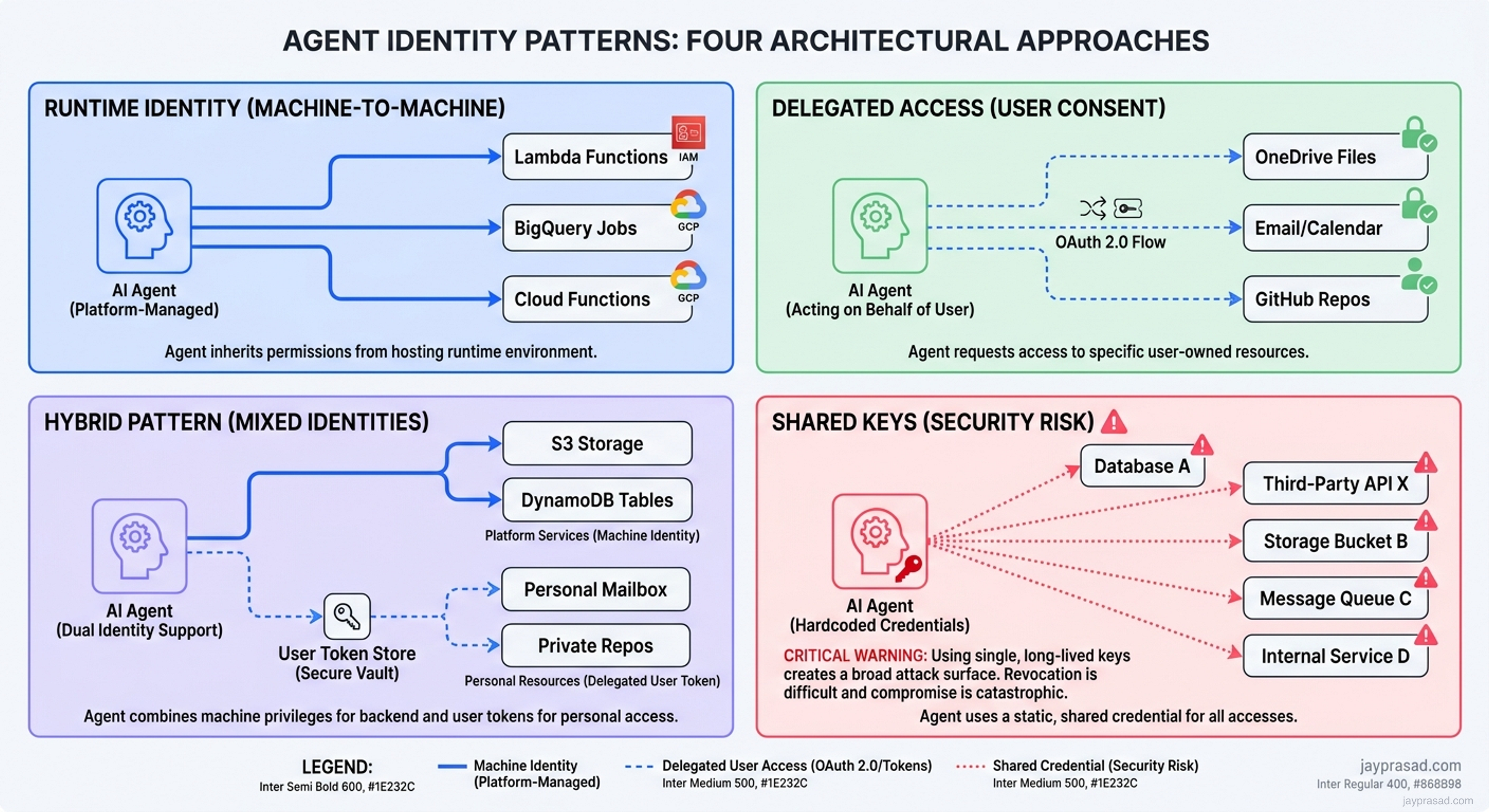
I use a simple rule. If the action belongs to the platform, the runtime should carry its own machine identity. If the action belongs to a person, the agent should use delegated access. If one workflow crosses both boundaries, I keep the two patterns separate instead of collapsing them into one credential.
The four patterns I see in practice
I keep coming back to the same four patterns. Three are useful in the right context. One is a shortcut that usually creates trouble later.
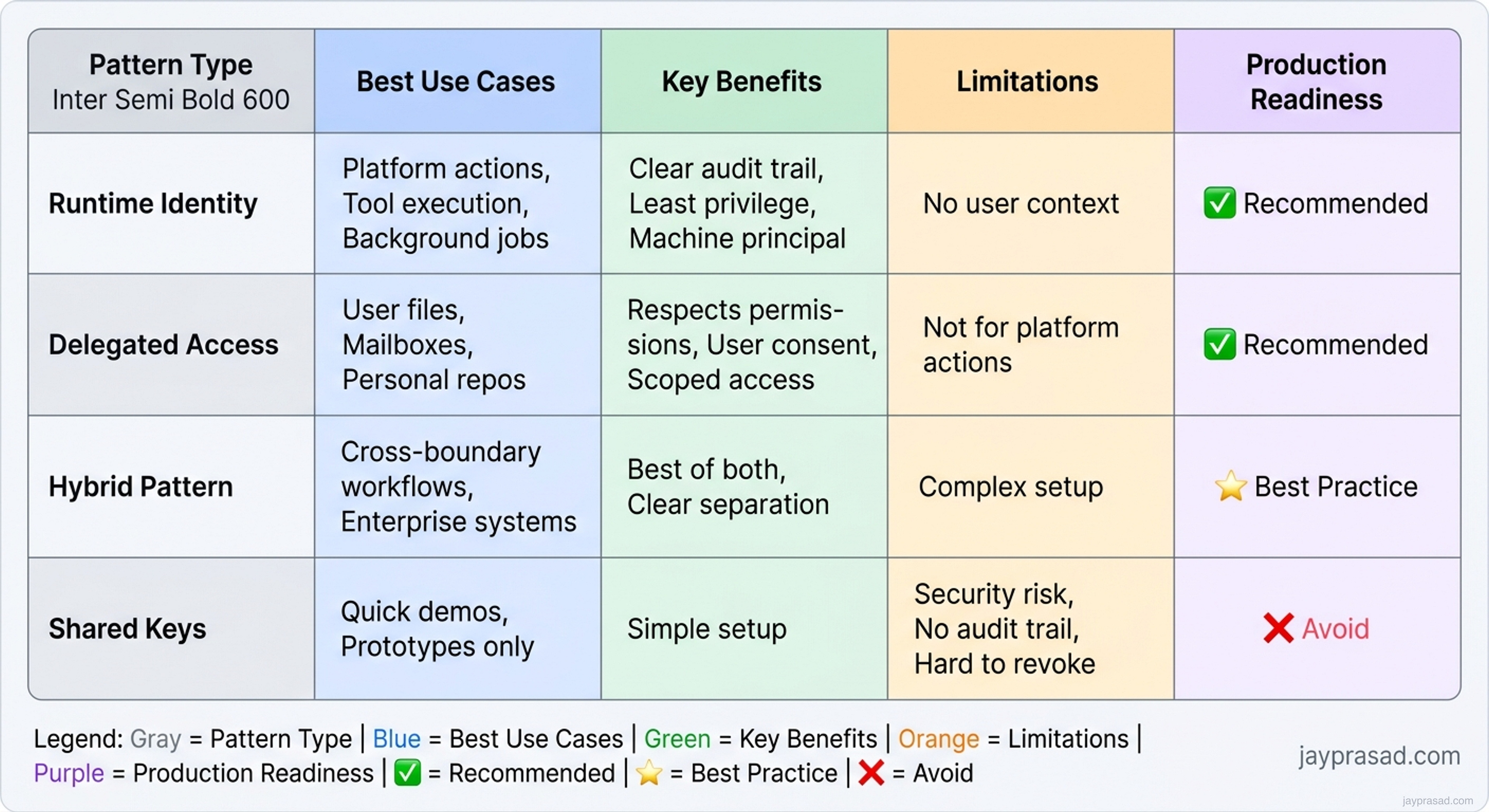
| Pattern | Best for | Why it works | Where it breaks | My take |
|---|---|---|---|---|
| Runtime identity | Platform-owned actions, tool execution, background jobs | Clear machine principal, least privilege, strong audit trail | Does not solve user-owned access on its own | My default for platform work |
| Delegated access | User-owned files, mailboxes, repos, calendars | Respects the user's existing permissions and consent | Bad fit for broad platform actions or shared automation | Use only where access belongs to a person |
| Hybrid pattern | Workflows that cross platform actions and user-owned systems | Keeps machine identity and user delegation separate | Takes more design work up front | Best enterprise pattern in serious agent systems |
| Shared keys | Fast demos and shortcuts | Easy to wire up once | Weak audit, weak revocation, no real boundary | Avoid in production |
A simpler way to decide
I do not start with vendor features. I start by asking what the agent is touching and who owns the action that follows. That is what tells me which identity pattern belongs in the design.
Which one I use, and why
Runtime identity for platform work
If the agent is running background jobs, calling internal tools, or taking platform-owned actions, I want the runtime to have its own machine identity. That gives me a non-human principal, scoped permissions, cleaner audit trails, and a straightforward revocation path.
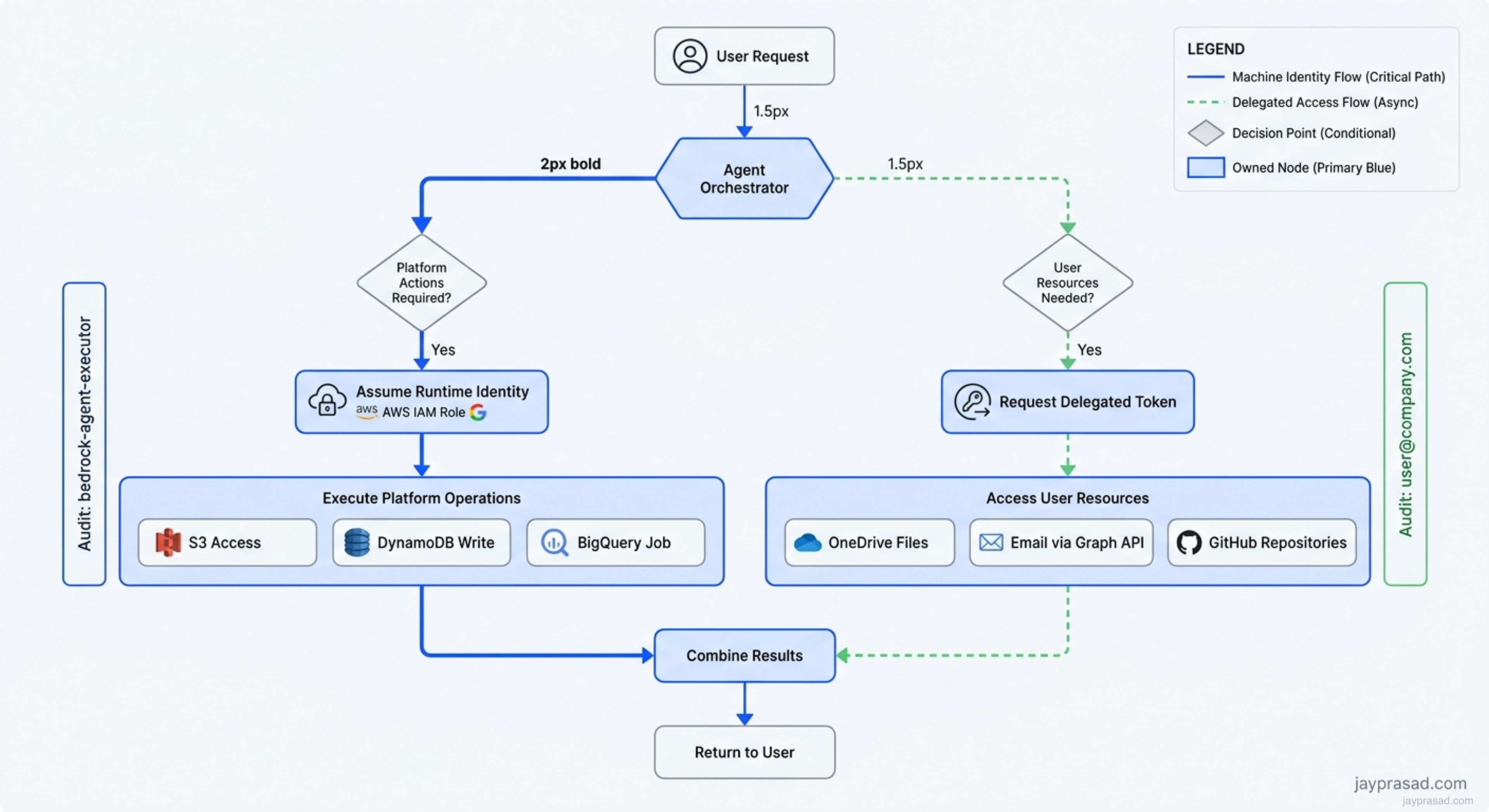
In AWS Bedrock agents, this means using IAM roles attached to the Lambda functions that execute your tools. The agent runtime assumes the role, gets temporary credentials, and operates under that machine identity. I see teams configure this correctly for S3 bucket access or DynamoDB operations. The audit trail shows "bedrock-agent-executor" performed the action, not some shared service account.
Google's Vertex AI takes a similar approach with service accounts. Your agent runtime gets its own service account identity, scoped to exactly what it needs. When I build agents that orchestrate BigQuery jobs or call Cloud Functions, the service account principle keeps the identity boundary clean.
Delegated access for user-owned systems
If the agent needs a user's files, mailbox, calendar, or repository access, I want delegated access instead. The action should stay inside the user's existing permission envelope. That keeps consent, scope, and revocation aligned with the person who actually owns that data.
Microsoft's Graph API gets this right for Copilot scenarios. When an agent needs to read your OneDrive files or send email on your behalf, it uses OAuth delegated permissions. The user explicitly consents, the token carries their identity, and the action happens within their existing access boundaries.
I see this pattern working well with GitHub's app authentication model. When CrewAI agents need to create pull requests or read repository contents, they can use GitHub Apps with user-to-server tokens. The agent acts on behalf of a specific user, respecting their repository permissions.
Hybrid when one workflow crosses both
The enterprise reality is that many useful workflows cross both boundaries. A runtime might need its own machine identity for platform work, then step into delegated access for one user-owned action. That is why I see the hybrid pattern as the real production default for serious agent systems.
LangGraph makes this pattern natural with its state management approach. I can design a workflow where the agent uses its runtime identity to query a vector database, analyze patterns, then switches to delegated access when it needs to update a user's Jira tickets. The state graph keeps these identity contexts separate and explicit.
Shared keys only for throwaway demos
I still see teams reach for one shared API key because it is fast. It is fast. It is also the wrong mental model for production. Shared keys flatten identity, make audit trails fuzzy, and turn revocation into a mess. If a workflow matters enough to keep, it matters enough to give the agent the right identity pattern.
Real architectures that get identity right
Let me show you what these patterns look like in production systems I have reviewed or built.
Document processing pipeline
A financial services client built an agent system using Anthropic Claude and AWS Bedrock. The architecture splits identity cleanly:
- Runtime identity (IAM role) for S3 bucket operations, Lambda invocations, and Bedrock model calls
- Delegated access (OAuth tokens) when the agent needs to fetch documents from SharePoint or update records in Salesforce
- Clear handoff points where the agent switches identity contexts
The key insight was treating SharePoint document access as user-owned, even though the processing pipeline itself was platform-owned. This kept compliance happy and made audit trails actually useful.
Customer support automation
I worked with a team using Google's Vertex AI Conversation to build support agents. Their identity architecture:
| Component | Identity Type | Implementation | Why This Choice |
|---|---|---|---|
| Dialog flow execution | Runtime identity | Vertex AI service account | Platform owns the conversation logic |
| CRM record lookup | Runtime identity | Dedicated service account for CRM API | Shared platform data, not user-specific |
| Email draft creation | Delegated access | OAuth2 with Gmail API | Email belongs to the support agent |
| Zendesk ticket updates | Hybrid | API token for read, OAuth for write | Respects support agent ownership |
This separation meant they could rotate the CRM credentials without breaking email delegation. When a support agent left, their delegated access revoked automatically without touching the platform components.
Code review assistant
A development tools company built a code review agent using LangChain and GitHub. They started with a shared GitHub PAT (personal access token) for everything. After a security review, they rebuilt with proper identity separation:
- Runtime identity via GitHub App for webhook processing and issue management
- Delegated access via user-to-server tokens for code comments and PR approvals
- Separate AWS IAM role for CodeGuru integration and CloudWatch metrics
The rebuild took three weeks but eliminated their biggest compliance blocker. Now each code review action traces back to either the system (for automated checks) or a specific developer (for review comments).
Implementation patterns that actually work
After building dozens of these systems, I see the same implementation patterns succeed repeatedly.
Token management hierarchy
I structure token storage and refresh in layers:
- Platform credentials in AWS Secrets Manager or Google Secret Manager
- User tokens in encrypted DynamoDB or Firestore with TTL
- Memory-only caches for active workflows
- Explicit token refresh before long-running operations
Azure AI Search integrations follow this pattern well. The indexer uses managed identity for Azure resources, while user queries might need delegated access for document-level permissions.
Identity context in agent state
Modern agent frameworks like AutoGen and CrewAI support complex state management. I always include identity context as explicit state:
# Simplified example structure
agent_state = {
    "workflow_id": "...",
    "current_identity": {
        "type": "runtime" | "delegated",
        "principal": "service-account@..." | "user@...",
        "scopes": ["read:repos", "write:issues"],
        "expires_at": "..."
    },
    "task_context": {...}
}
This makes identity transitions explicit in the workflow definition. When debugging production issues, I can trace exactly which identity executed each step.
Boundary enforcement rules
I enforce identity boundaries through policy, not just documentation:
| Boundary Type | Enforcement Method | Example Tool |
|---|---|---|
| Platform to user | Explicit state transition required | LangGraph state validation |
| User to platform | Credential type checking | AWS IAM policy conditions |
| Cross-tenant | Separate agent instances | Kubernetes namespace isolation |
| Audit requirements | Structured logging with principal | OpenTelemetry attributes |
Common identity mistakes I see teams make
Beyond using shared keys, I see three patterns that create problems at scale.
Identity inheritance chains
Teams let agents inherit credentials from their runtime environment. An agent running in Kubernetes might inherit the pod's service account, which has broad permissions for "flexibility." This breaks least-privilege and makes rotation painful.
I fix this by giving each agent its own identity, separate from the infrastructure identity. In EKS, this means IRSA roles specific to the agent, not the node or pod defaults.
Token scope creep
A delegated token starts with minimal scopes, then grows over time as the agent needs "just one more permission." Six months later, your document summarizer has write access to the entire Google Drive.
I prevent this by versioning scope requirements with the agent code. When an agent needs new permissions, it gets a new version number and explicit re-consent flow.
Mixed identity in tool definitions
I see LangChain tools defined with hardcoded credentials or implicit identity assumptions. A SQL query tool might assume it always runs with the same database credentials, mixing platform and user access.
Better approach: make identity requirements explicit in tool definitions. AutoGen's tool registration supports this pattern well, letting you declare whether a tool needs runtime or delegated identity.
What this means for your team
If you are building agent systems today, you need an identity strategy before you write the first tool integration. Here is my practical advice:
Start with the hybrid pattern as your default assumption. Most valuable agent workflows will eventually cross identity boundaries. Design for this from day one instead of retrofitting later.
Pick frameworks that make identity explicit. LangGraph's state management, AutoGen's conversation patterns, and Vertex AI's service account model all support clean identity separation. Avoid frameworks that hide identity behind "simple" abstractions.
Build identity transitions into your testing. Your integration tests should verify that delegated tokens actually scope down permissions, that runtime identity cannot access user resources, and that audit logs capture the right principal for each action.
Document identity boundaries in your architecture diagrams. I use different colors or line styles to show where runtime identity ends and delegated access begins. This makes security reviews much faster.
My default framework
That is the framework I use. It is simple enough to teach, practical enough to implement, and strict enough to keep agent systems governable once they leave the demo and start touching real enterprise systems.
The key insight remains the same: agent identity is not about credentials. It is about choosing the right pattern for who owns the action. Get this right, and your agent systems scale cleanly. Get it wrong, and you will be untangling identity spaghetti for years.
Discussion
Responses, reactions, and open questions.
The article stays static. The conversation sits underneath it. Sign in with your email, react to the argument, and join the discussion.
Join the discussion
Use your email to get a one-time sign-in code. First comments may wait in moderation before they appear publicly.